


After having multiple people with problems adding a second computer in their house with their existing cable modem, I finally did some digging into the router setup of one of the best home routers you can get from your local computer supply store, Walmart, or Best Buy.
The main issue with hooking up a router to the cable modem is the setup disk that you run for the first time, binds your machine to that modem. So what we have to do is make the modem think that the router is your computer, then you can hook multiple machines to the router with one internet connection.
First of all, leave your computer connected the way it is to the modem.
Second, goto your network connections window in your control panel, and right click on your local area connection icon and click on properties. Then be sure that 2 boxes -->Show icon in notification area when connected and Notify me when this connection has limited or no connectivity are checked. If not, check them, then hit ok.
This will put the 2 little network connection monitors icon down bottom right by your clock telling you when you have a network connection.

Goto Start, Run and then type CMD to get a dos command prompt.
Then type ipconfig/release and hit enter
Next type ipconfig /renew and hit enter, this will give you a fresh ipaddress from the cable modem to be sure it's working right.

Now unplug the network cable from the modem that goes to your computer, and plug it into the back of the router into one of the ports labled 1 to 4, NOT the WLAN port.
Now, in the CMD window again type ipconfig /release hit enter, then type ipconfig /renew hit enter.
This will give you an ipaddress from the router.
Open up internet explorer or firefox which is even better! This will give you an error page...don't worry. Up in the address bar type the access ip of your brand new router to get to the configure page of the router. A brand new unconfigured router will need the address 192.168.1.1 typed into the address bar, and you will get a login box. Do not type anything into the user name, just click into the password part and type admin. This is the default password for the router which you shpuld change soon to something else you won't forget.
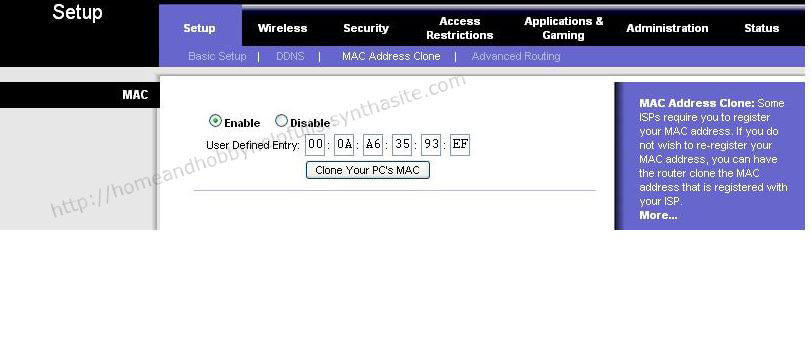
The setion you want to goto is Setup, Mac address clone. Enable this and click clone PC's Mac address. Click on save and wait a few seconds. DDWRT users, see the other picture.

Now, plug one end of a network cable into the cable modem, and the other end into the WLAN port on the router.
On your internet browser you should still be on your setup page. Across the top, goto Status. Then click the DHCP renew button. Click save. This will give your router an ip address from your modem.
